
Reference for the workflow commands you'll run day-to-day. Setup commands — wavedash auth * and wavedash update — live with Authentication and Installation.
Initialize a project
wavedash initInteractively scaffolds a wavedash.toml in the current directory. Detects Godot or Unity from the project files (otherwise treats the folder as a custom web build), prompts you to pick or create a team and a project, and writes the matching config. If a wavedash.toml already exists, you'll be asked whether to reinitialize.
Requires authentication — run wavedash auth login first.
Teams and projects
Most users set up their team and project interactively via wavedash init. These scripted commands are useful for CI or when you already know the IDs you want to pass around.
wavedash team create --name "My Studio"Creates a new team and prints the team ID plus its Developer Portal URL.
| Option | Description |
|---|---|
--name <NAME> | Team name (required) |
wavedash team listLists every team you belong to. Prints a table with ID, Slug, and Name columns. Pass --json to get a JSON array instead — easier to pipe into other tools.
| Option | Description |
|---|---|
--json | Output as a JSON array instead of a table |
wavedash project create --title "My Game" --team-id <TEAM_ID>Creates a new project under the given team and prints the project ID plus its Developer Portal URL. The project ID is what you put in wavedash.toml as game_id.
| Option | Description |
|---|---|
--title <TITLE> | Project title (required) |
--team-id <TEAM_ID> | ID of the team that owns the project (required) |
wavedash project list --team-id <TEAM_ID>Lists every project (game) owned by the team. Prints a table with ID, Slug, and Title columns. Pass --json to get a JSON array instead.
| Option | Description |
|---|---|
--team-id <TEAM_ID> | ID of the team to list projects for (required) |
--json | Output as a JSON array instead of a table |
Local development
wavedash devServes your game from a local server and opens it in your browser so you can test the SDK, achievements, and other platform features before pushing a build. The CLI reads upload_dir from wavedash.toml, registers a temporary local build with the API, signs the browser in through wavedash.com, and injects the SDK pointed at sandbox data.
| Option | Description |
|---|---|
-c, --config <PATH> | Path to wavedash.toml (default: ./wavedash.toml) |
--no-open | Don't automatically open the browser; just print the local URL |
The sandbox validates your SDK wiring locally. It does not replace a final smoke test of the uploaded build on Wavedash.
Like build push, dev takes no --game-id. Set WAVEDASH_GAME_ID to point a session at a different game, or WAVEDASH_UPLOAD_DIR to run against a build directory other than the configured one.
Stuck seeing old assets?
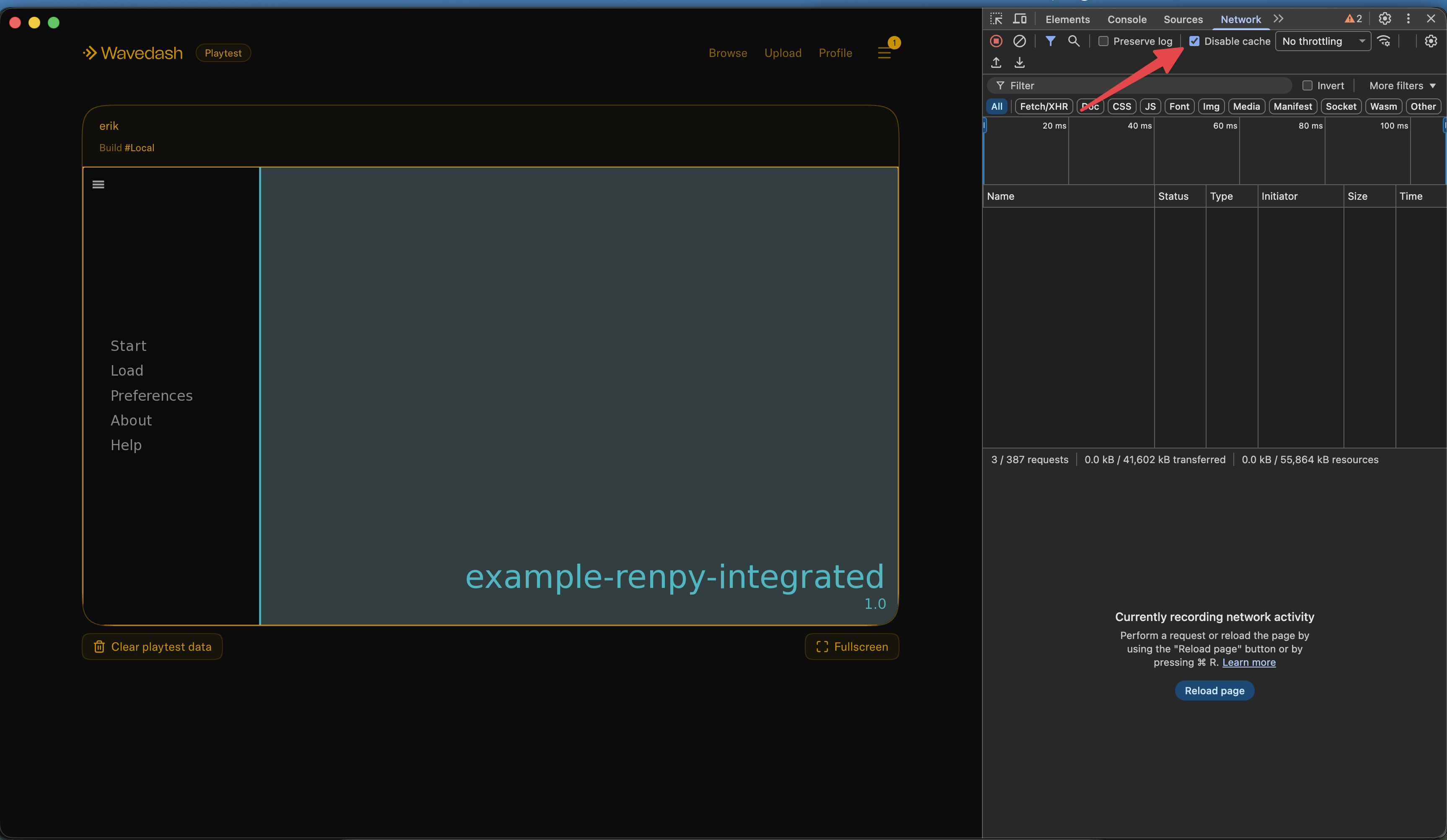
wavedash dev serves your files with Cache-Control: no-store, so a normal reload picks up a rebuild. If the browser still shows an old version — usually a tab left open from before the rebuild — hit Cmd+Shift+R (Force Reload). You can also open DevTools, go to the Network tab, and check Disable cache, which bypasses the cache for as long as DevTools is open.
Build and push
wavedash build pushUploads everything under upload_dir and registers a new immutable build for the configured game_id. Old builds stay available for rollback. When the upload finishes, the CLI prints the build's ID and a playtest URL.
| Option | Description |
|---|---|
-c, --config <PATH> | Path to wavedash.toml (default: ./wavedash.toml) |
-m, --message <TEXT> | Build description or changelog note |
build push has no --game-id flag. To send a build somewhere other than the configured game — a test game from CI, say — set WAVEDASH_GAME_ID for that run. WAVEDASH_UPLOAD_DIR, WAVEDASH_ENTRYPOINT, and the engine version variables apply here too, and the CLI prints an env override: line for each one it uses.
Uploading does not publish the build. Use the printed build ID with wavedash publish, or open the Developer Portal and promote the build when you're ready to make it live.
Verify config
Confirm game_id and upload_dir match your engine output.
Push
Run wavedash build push and wait for the new build ID.
Publish
Run wavedash publish <BUILD_ID> or publish the uploaded build from the Developer Portal.
Publish a build
wavedash publish <BUILD_ID>Makes an uploaded build live for players. Copy the build ID from the Build ID line printed by wavedash build push, or from the Developer Portal builds list.
| Argument | Description |
|---|---|
<BUILD_ID> | Build ID returned by wavedash build push |
| Option | Description |
|---|---|
-c, --config <PATH> | Path to wavedash.toml (default: ./wavedash.toml) |
--title <TEXT> | Release title |
--summary <TEXT> | Release summary |
--added <TEXT> | Added change item; pass multiple times for multiple items |
--removed <TEXT> | Removed change item; pass multiple times for multiple items |
--fixed <TEXT> | Fixed change item; pass multiple times for multiple items |
--adjusted <TEXT> | Adjusted change item; pass multiple times for multiple items |
--notify-players | Notify previous players of the update. Requires a nonblank summary or patch note; limited to once every 24 hours per game |
-y, --yes | Skip the confirmation prompt (alias --force). Required when CI is set (to anything but 0 or false) or stdin isn't a terminal; without it the command exits without publishing |
publish asks you to confirm before making the build live. In a non-interactive shell it refuses to guess, so pipelines must pass --yes.
Example with release notes:
wavedash publish <BUILD_ID> \
  --title "Version 1.0.1" \
  --summary "Small polish pass." \
  --fixed "Fixed fullscreen sizing" \
  --adjusted "Tuned input timing" \
  --adjusted "Updated default settings"
Add --notify-players to send an update notification to previous players:
wavedash publish <BUILD_ID> --notify-players --summary "New levels and bug fixes." --yesNotifications are off by default. A title alone is not enough: provide a nonblank --summary or at least one --added, --removed, --fixed, or --adjusted item.
The notification cooldown is shared across the CLI and Developer Portal, and across everyone publishing the game. If players were notified less than 24 hours ago, publishing with --notify-players fails with an error and does not publish the build or send another notification. Wait until the cooldown expires, or rerun without --notify-players to publish immediately without notifying players. --yes skips confirmation but does not bypass the cooldown.
Stats
Stats are per-game counters that the SDK reports. They power stat-triggered achievements and surface as user progress on the Wavedash side.
Every stat command accepts --game-id <GAME_ID> to target a game explicitly. When omitted, the CLI falls back to WAVEDASH_GAME_ID and then to game_id in the wavedash.toml at --config (default ./wavedash.toml). If you aren't running from a project directory, find the ID with wavedash project list --team-id <TEAM_ID> and pass --game-id directly — or export WAVEDASH_GAME_ID once and drop the flag from every command in the script.
wavedash stat create --identifier KILLS_TOTAL --name "Total Kills"Creates a stat. --identifier is the stable string you reference from your game code; --name is the human-readable display name shown in the Developer Portal.
| Option | Description |
|---|---|
--identifier <IDENTIFIER> | Stat identifier, e.g. KILLS_TOTAL (required) |
--name <NAME> | Display name (required) |
--game-id <GAME_ID> | Game ID; defaults to WAVEDASH_GAME_ID, then game_id in wavedash.toml |
-c, --config <PATH> | Path to wavedash.toml (default: ./wavedash.toml) |
wavedash stat update --id <STAT_ID> --identifier KILLS_TOTAL --name "New Display Name"Updates a stat's identifier and display name. Both --identifier and --name are required — the command rewrites both fields. <STAT_ID> is the document ID returned from stat create.
| Option | Description |
|---|---|
--id <STAT_ID> | Stat document ID (required) |
--identifier <IDENTIFIER> | New identifier (required) |
--name <NAME> | New display name (required) |
--game-id <GAME_ID> | Game ID; defaults to WAVEDASH_GAME_ID, then game_id in wavedash.toml |
-c, --config <PATH> | Path to wavedash.toml (default: ./wavedash.toml) |
wavedash stat delete --id <STAT_ID> [--force]Deletes a stat. If any user progress is attached to the stat, the command refuses to delete unless --force is passed.
| Option | Description |
|---|---|
--id <STAT_ID> | Stat document ID (required) |
--force | Delete even when user progress records exist for this stat |
--game-id <GAME_ID> | Game ID; defaults to WAVEDASH_GAME_ID, then game_id in wavedash.toml |
-c, --config <PATH> | Path to wavedash.toml (default: ./wavedash.toml) |
Achievements
Achievements unlock either when your game calls the SDK directly (standard) or automatically when a stat crosses a threshold (stat-triggered).
Every achievement command accepts --game-id <GAME_ID> to target a game explicitly. When omitted, the CLI falls back to WAVEDASH_GAME_ID and then to game_id in the wavedash.toml at --config (default ./wavedash.toml).
wavedash achievement listLists the game's achievements. By default, the command prints a table with each achievement's ID, identifier, title, description, secret status, stat ID, and threshold. The ID can be passed to achievement update or achievement delete. Pass --json to get the API fields as a JSON array for scripts instead.
If the game has no achievements, the command prints No achievements found. (or [] with --json).
| Option | Description |
|---|---|
--json | Output as a JSON array instead of a table |
--game-id <GAME_ID> | Game ID; defaults to WAVEDASH_GAME_ID, then game_id in wavedash.toml |
-c, --config <PATH> | Path to wavedash.toml (default: ./wavedash.toml) |
wavedash achievement create \
  --identifier FIRST_WIN \
  --title "First Win" \
  --description "Win your first match."
Creates a standard achievement. Add --triggered-by-stat-id <STAT_ID> --threshold <N> to make it stat-triggered, --secret to hide it until unlocked, and --image <PATH> to attach an icon (jpg, jpeg, png, webp, or avif).
| Option | Description |
|---|---|
--identifier <IDENTIFIER> | Achievement identifier, e.g. FIRST_WIN (required) |
--title <TITLE> | Display title (required) |
--description <TEXT> | Achievement description (required) |
--secret | Hide the achievement until a player unlocks it |
--triggered-by-stat-id <STAT_ID> | Stat document ID that auto-unlocks this achievement |
--threshold <N> | Stat value required to unlock (required when --triggered-by-stat-id is set) |
--image <PATH> | Path to an icon file (jpg, jpeg, png, webp, avif) |
--game-id <GAME_ID> | Game ID; defaults to WAVEDASH_GAME_ID, then game_id in wavedash.toml |
-c, --config <PATH> | Path to wavedash.toml (default: ./wavedash.toml) |
wavedash achievement update --id <ACHIEVEMENT_ID> [flags]Updates only the fields you pass. Pass --triggered-by-stat-id "" (empty string) to clear an existing stat trigger and turn the achievement back into a standard one.
| Option | Description |
|---|---|
--id <ACHIEVEMENT_ID> | Achievement document ID (required) |
--identifier <IDENTIFIER> | New identifier |
--title <TITLE> | New display title |
--description <TEXT> | New description |
--secret <true|false> | Toggle the secret flag |
--triggered-by-stat-id <STAT_ID> | Set a new stat trigger, or "" to clear |
--threshold <N> | New stat threshold (required when setting --triggered-by-stat-id) |
--image <PATH> | Replace the icon with a new image (jpg, jpeg, png, webp, avif) |
--game-id <GAME_ID> | Game ID; defaults to WAVEDASH_GAME_ID, then game_id in wavedash.toml |
-c, --config <PATH> | Path to wavedash.toml (default: ./wavedash.toml) |
wavedash achievement delete --id <ACHIEVEMENT_ID> [--force]Deletes an achievement. If any user has unlocked it, the command refuses to delete unless --force is passed.
| Option | Description |
|---|---|
--id <ACHIEVEMENT_ID> | Achievement document ID (required) |
--force | Delete even when user unlock records exist for this achievement |
--game-id <GAME_ID> | Game ID; defaults to WAVEDASH_GAME_ID, then game_id in wavedash.toml |
-c, --config <PATH> | Path to wavedash.toml (default: ./wavedash.toml) |
Clear playtest data
Playtesting leaves records behind — unlocked achievements, cloud saves, stat progress, leaderboard entries, paid-content entitlements, and UGC. This command deletes them so you can run a flow again from a clean slate.
wavedash clear-playtest-dataWith no category flags, this clears every category for every player. The CLI lists exactly what it is about to delete and asks you to confirm first.
Only sandbox data is affected. The command targets your game's sandbox environment — the one wavedash dev and playtest builds write to. Data belonging to players of your published game is never touched, so this is safe to run on a live game.
| Option | Description |
|---|---|
-u, --username <USERNAME> | Only clear this player's data; omit to clear every player's. Alias: --user |
--achievements | Clear achievement progress. Alias: --achs |
--cloud-saves | Clear cloud saves. Alias: --saves |
--stats | Clear stat progress |
--leaderboards | Clear leaderboard entries. Alias: --lbs |
--paid-content-entitlements | Clear paid content entitlements. Aliases: --entitlements, --ents |
--user-generated-content | Clear user-generated content. Alias: --ugc |
-y, --force | Skip the confirmation prompt; required when non-interactive. Alias: --yes |
--game-id <GAME_ID> | Game ID; defaults to WAVEDASH_GAME_ID, then game_id in wavedash.toml |
-c, --config <PATH> | Path to wavedash.toml (default: ./wavedash.toml) |
Choosing what to clear
Pass one or more category flags to narrow what gets cleared. Passing any of them limits the operation to just those categories:
wavedash clear-playtest-data --achievements --statsScope the wipe to one player by username:
wavedash clear-playtest-data --username somePlayerConfirmation and automation
The confirmation prompt defaults to no, so an accidental Enter cancels. Pass --force (short -y, alias --yes) to skip it.
Because the command is destructive, it refuses to guess when it cannot prompt — either CI is set to a truthy value or stdin is not a terminal. In those environments the run fails unless you pass --force explicitly:
wavedash clear-playtest-data --leaderboards --forceCaveats
Deletion is not immediate. A successful run means the sweeps were scheduled, not that they have finished — larger data sets drain over follow-up batches, so records can linger for a moment after the command returns.
Partial clears aren't reconciled across categories. They can leave a player in a state normal play can't produce: clear --achievements but not the stat that triggers them and the stat stays above its threshold with the achievement locked — triggers are only re-evaluated when your game writes that stat, so it may never unlock again. The reverse leaves an achievement unlocked with its stat back at zero. Clear a stat-triggered achievement and its stat together, or use the no-flag form.
Cloud saves are only cleared on Wavedash's servers. Your browser also keeps a copy on your own machine, and your game can upload that copy again the next time it saves — so the save may look like it came back. To test from a genuinely empty save, clear the browser's stored data for the game (in Chrome: DevTools → Application → Clear site data) or reopen the game in a private window.
Global options
These flags apply to every subcommand:
| Option | Purpose |
|---|---|
--help | Show help for the command |
--verbose | Increase log detail |
wavedash --version prints the CLI version. It only works on the bare command, not after a subcommand.
Any command that reads wavedash.toml also honors the WAVEDASH_* overrides, and can run without a config file when the environment supplies what it needs — see Environment variables.